Aida count: the resolution that decides your finished size
You've found the perfect chart, but now you need the fabric. You look at the options on the shelf — 11, 14, 16, 18 — and they all just look like blank canvas. But that number is the single biggest decision you'll make before threading a needle. The same chart stitched on different counts will give you a different finished size, a different floss budget, and a different feeling under the hand.
So here's the short version. Aida count is the number of stitches that fit into one inch (2.54 cm) of fabric. 14 is the universal default; 11 runs larger and forgives more; 18 is fine and detail-heavy. The same chart on a higher count comes out smaller, on a lower count larger. To get the finished size in centimeters, divide your chart's stitch dimensions by the count and multiply by 2.54 — one line, no kit calculator needed.
What the number actually means
"Count" simply refers to the number of stitches that fit into one inch (2.54 cm) of fabric.
Most kit patterns default to Aida — a tight weave invented by the German mill Zweigart in the late 19th century, with clear holes at the corners that guide the needle straight into ready-made cells. The name has since become generic, like Kleenex or Velcro.
Here is the standard lineup:
- 11 count — chunky and easy on the eyes. Great for beginners or quick, bold projects.
- 14 count — the universal standard. If a pattern doesn't specify, assume it's this.
- 16 count — the sweet spot. Better detail than 14, without needing a magnifying glass.
- 18 count — for the detail-obsessed. Perfect for full-coverage pieces, complex shadows, and delicate portraits.
The palette and the design don't change with the count, but your thread consumption definitely does. The larger the cell, the more floss each cross eats up.
The basic math: stitches to centimeters
To figure out the exact size of your finished piece, divide the pattern's stitch dimensions by the fabric count, then multiply by 2.54.
(stitch count ÷ count) × 2.54 = size in cm
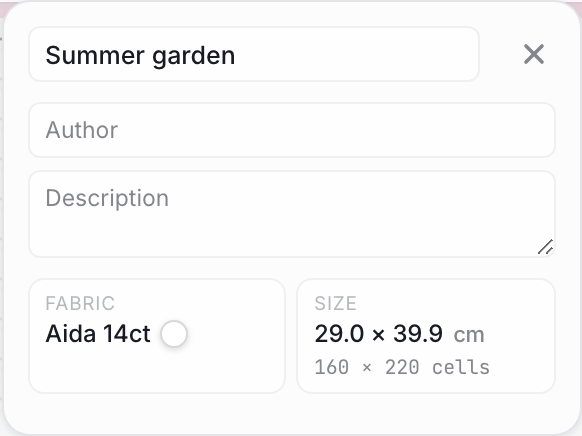
Take a 160 × 220 stitch design. On standard 14 count, it's a respectable 29 × 40 cm. Bump that to 18 count, and it shrinks down to 23 × 31 cm. You haven't changed a single pixel of the chart or swapped out a single skein of DMC, but you've just shaved off a third of the required fabric.
Drop the other direction to 11 count, and the same piece grows to 37 × 51 cm.
11, 14, 16, 18 — side by side
Here is how that same 160 × 220 sampler behaves across the four main counts:
| Count | Grid step | Finished size | Best for |
|---|---|---|---|
| 11 | ≈ 2.31 mm | ≈ 37 × 51 cm | Big pieces, beginner projects, stitching with kids |
| 14 | ≈ 1.81 mm | ≈ 29 × 40 cm | The classic. Standard floss tables are built around this size |
| 16 | ≈ 1.59 mm | ≈ 25 × 35 cm | Fine detail with a comfortable stitching experience |
| 18 | ≈ 1.41 mm | ≈ 23 × 31 cm | Miniatures and photorealism. Requires good lighting and patience |
Floss usage shifts right alongside the dimensions. On 11 count, you'll likely stitch with three strands, burning through almost twice as many skeins as you would on 14. On 18 count, the tiny crosses save you roughly a quarter of your thread budget.
Where the physical limits kick in
In a digital editor, you can zoom in and out forever. In reality, thread and fabric have physical constraints you can't ignore.
Show-through. On lower counts like 11, stitching with the standard two strands often leaves the canvas peeking through, and the result looks patchy. You'll either need a third strand or a fabric color that blends with your design.
Crowding. On the flip side, cramming too much thread into 18 count makes the stitches bulge and the fabric warp. If things get tight, drop the strand count rather than sticking to your default habits.
Detail level. On 11 count, your work reads like coarse pixel art — a leaf vein or a sharp shadow breaks down into blocky cells. On 18, the same crosses fuse into a smooth, almost photographic image — but the price is faster eye fatigue.
Sizing to a frame
Sometimes the frame comes first — maybe you inherited a beautiful vintage piece, or found the perfect mat at a flea market. To figure out what fits inside, just run the formula in reverse. Convert the visible opening to inches and multiply by the count.
inches × count = stitch budget
A 5 × 7 inch frame (about 13 × 18 cm) holds 70 × 98 stitches on 14 count. On 18 count, you can fit 90 × 126 stitches in that exact same space, opening the door to a much more intricate design.
Always add 7–10 cm of blank fabric on every side for stretching and framing — without it the cloth has nothing to grip the hoop or frame edge.
Evenweave and linen: the over-two rule
Moving from Aida to evenweave or linen often feels like leveling up. There are no neat "squares" here; you generally stitch over two threads of the weave.
To find your Aida equivalent, just divide the evenweave count by two:
- 25 evenweave ≈ between 11 and 14 Aida (25 ÷ 2 = 12.5)
- 28 evenweave or linen ≈ exactly Aida 14 (28 ÷ 2 = 14)
- 32 linen ≈ Aida 16
- 36 linen ≈ Aida 18
A good rule of thumb: lock in your ideal finished size by picking an Aida count first, then look across for the equivalent in evenweave or linen. The centimeters stay the same, but you get a beautifully smooth background free of Aida's tell-tale holes. That makes a massive difference on sparsely stitched designs.
Needles by count
Tapestry needles have blunt tips that part the fabric rather than pierce it. You can experiment, but here is a reliable baseline:
| Count | Needle | Strands |
|---|---|---|
| 11 | №22 | 3 strands |
| 14 | №24 | 2 strands |
| 16 | №24–26 | 2 strands |
| 18 | №26 | 1–2 strands |
These are just starting points. Pick the needle that suits your tension and the density of the fabric. I personally keep a size 28 needle handy for evenweave, but use what feels right to you.
Frequently asked
What does aida count mean?
Aida count is the number of stitches that fit into one inch (2.54 cm) of fabric. The higher the number, the smaller each stitch — and the smaller your finished piece at the same stitch count. 14 is the universal default; 11 is chunky and forgiving; 18 is fine and detail-heavy.
What aida count is best for beginners?
14 count is the safest first choice — large enough to count comfortably, small enough that the finished piece doesn't look coarse. If your eyes tire fast, or you're stitching with kids, drop to 11 count instead. Skip 16 and 18 until you have a few finished pieces under your belt.
What's the difference between 14 and 16 count aida?
On 14 count you stitch 14 crosses per inch; on 16, sixteen. The same chart shrinks by about 13% moving from 14 to 16, detail looks crisper, and floss use drops a bit. The trade-off is eye strain — at 16 you start wanting better light and probably a stand.
How do I figure out the size of my finished cross stitch?
Divide the chart's stitch dimensions by the fabric count, then multiply by 2.54. A 160 × 220 stitch chart works out to 29 × 40 cm on 14 count, and 23 × 31 cm on 18 count. Always add 7–10 cm of blank fabric on every side for framing.
Do I need a different needle for different aida counts?
Yes — heavier counts take a thicker needle, finer counts a slimmer one. Standard pairings: №22 for 11 count (3 strands), №24 for 14 count (2 strands), №24–26 for 16, №26 for 18 (1–2 strands). Always tapestry needles — sharp embroidery needles split the fabric threads instead of parting them.
In ixo: letting the app do the math
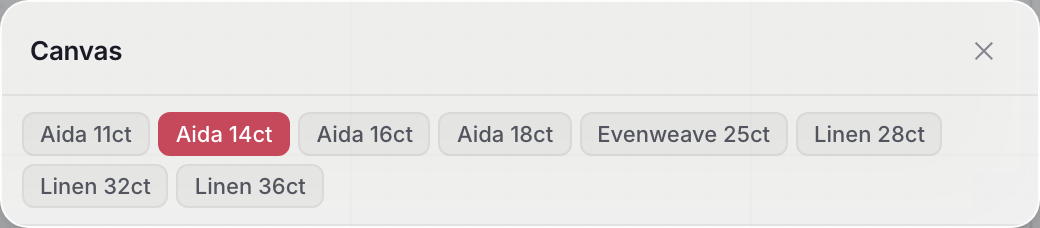
If you're using ixo (the browser-based cross-stitch editor), you don't have to calculate any of this manually. Just toggle the fabric setting on the size card — Aida 11, 14, 16, 18, evenweave, or linen — and watch the finished centimeters update in real time.
It takes the guesswork out of framing, prevents sizing mistakes, and lets you focus on the design itself. Pick the count well, and it stops being a confusing number on a label — it becomes the choice between a monumental piece that catches the eye across the room and an intimate, jeweler's-grade work that asks you to come close.
Open the editor and create your first chart
No install, no signup. Drag a PDF in or start fresh — you’re creating in under a minute.
Open ixo editor